

Intro
When it comes to a new project, you usually cannot skip several things: APIs, authentication + authorization, identity, and end-user sign-in flow. It used to be hard to kick off these things because there are many concepts and technologies that spread widely: RESTful/GraphQL, web frontend, native client, connect clients with APIs, auth best practices to balance security and user experience, etc.
Also, most of the works are “repeating”. I mean, they are needed and similar for almost every project, with some tweaks.
Sounds scary and tedious? Don’t panic. Today we have open source. With the two open-source projects below, things become not tricky :
- Logto: Helps you build the sign-in, auth, and user identity within minutes.
- Hasura: Blazing fast, instant real-time GraphQL APIs on your DB with fine-grained access control.

In this article, we’ll focus on connecting Logto and Hasura, which enables you to implement authentication, authorization, and GraphQL APIs without friction. Thus you can quickly jump into your business without rocket-science learning.
Get started
Prerequisites
Since both Logto and Hasura have a decent get-started guide, we assume you have read them and have a basic feeling. Access to a running instance of both is needed.
We assume the accessible endpoints are:
- Logto:
http://localhost:3001 - Hasura:
http://localhost:8080
ℹ️ If you are using Docker/Docker Compose, for accessing of your machine(host)’s
localhost, you can use the Docker magic stringhost.docker.internal. In this case, the Logto endpoint will behttp://host.docker.internal:3001.
Also, we assume you have a preferred platform and framework to build the client app, say React or Next.js.
Set up API in Logto
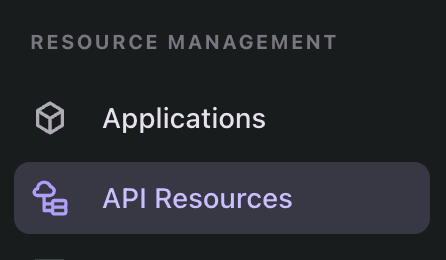
In the left navigation sidebar of your Logto Admin Console, click “API Resources”, and you’ll see the API Resource management page.
Then click the huge “+ Create API Resource” button in the top-right corner. In the opening modal, enter Hasura for API name and https://hasura.api for API identifier.
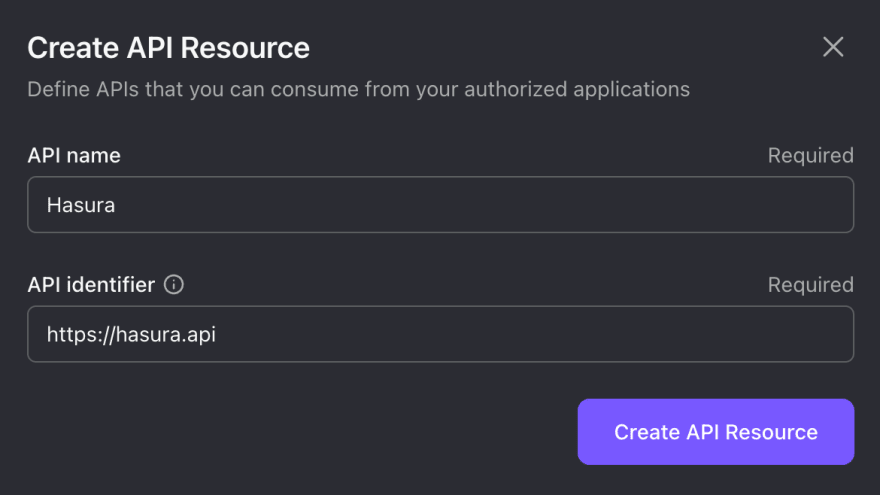
We’ll use this API identifier for the rest of our article. But feel free to change the values based on your preference.
Click “Create API Resource”, and it will show a message that indicates the resource has been successfully created. That’s all we need in Logto for now.
Enable webhook authentication in Hasura
Hasura uses role-based access management, which handles authorization. So, we only need to figure out authentication. It supports two methods: Webhook and JWT. We choose webhook since it’s more flexible.
To enable webhook authentication, you must set the admin secret and auth hook endpoint.
- The admin secret is the key to having Hasura admin access when sending requests. It is required before enabling webhook authentication. Remember to keep it somewhere safe, and don’t use it in production.
- The auth hook endpoint is a URL to send authentication requests.
You can set them via environment variables:
HASURA_GRAPHQL_ADMIN_SECRET: myadminsecretkey # Replace with your own secret HASURA_GRAPHQL_AUTH_HOOK: http://localhost:3001/api/authn/hasura?resource=https://hasura.api You may notice we use the API identifier filled in Logto to build the auth hook endpoint. It ensures that the user is passing the correct bearer token instead of a random one that may from malicious.
You need to update the auth hook endpoint if you have a different Logto endpoint or API indicator. Say you have https://logto.domain.com as the Logto endpoint and https://graphql.domain.com as the API identifier, then it will be:
HASURA_GRAPHQL_AUTH_HOOK: https://logto.domain.com/api/authn/hasura?resource=https://graphql.domain.com From now, for every GraphQL request, Hasura will bring all request headers to the Logto auth hook endpoint, and Logto will respond properly.
Send secured GraphQL requests
Summary
Since we won’t use the Hasura admin secret in production, every GraphQL request is secured by the following headers:
-
AuthorizationThe standard bearer token that Logto generates. -
Expected-RoleThe role you want Logto to show in the auth hook response.
⚠️ If the user that the
Authorizationheader indicates doesn’t have theExpected-Role, Logto will respond with401 Unauthorized.
The Authorization header requires a valid Access Token in JWT format with the Hasura API indicator for audience. Hold on – it’s quite hard to remember and compose all these things. Fortunately we get Logto SDKs to simplify the geeky part.
Set default roles in Logto
By default, only the first user will have an admin role name. After that, Logto will NOT assign any role names to new users. But for Hasura, it is necessary to have a role to perform an authed request.
While access control is still an under-the-hood feature of Logto, we don’t want you to manually add the default role names. You can set an environment variable USER_DEFAULT_ROLE_NAMES with a comma-separated string for Logto. E.g.:
USER_DEFAULT_ROLE_NAMES: user,good_user Then two roles user and good_user will be automatically added to newly created users. It will reflect in both users table and Access Tokens.
Integrate Logto SDK
Follow the integration guide to integrate a Logto SDK in your client app. It enables not only the ability to generate a valid Access Token for GraphQL requests, but also a smooth sign-in experience for your end-users.
Once you finish the guide, we need one tiny modification to the LogtoConfig: Add the API indicator you created in Logto Admin Console to resources. Taking React SDK as an example:
const config: LogtoConfig = { endpoint: 'http://localhost:3001', appId: '<your-application-id>', resources: ['https://hasura.api'], // Add this line }; Send requests
Finally! After the user is signed in, use getAccessToken() in Logto SDK to fetch the Access Token for Hasura GraphQL requests:
const accessToken = await logto.getAccessToken('https://hasura.api'); // Before sending the request request.headers.set('Authorization', `Bearer ${accessToken}`); request.headers.set('Expected-Role', 'user'); Recap
With the effort above, we successfully implemented all the non-skippable things in the intro:
- A database-schema-driven GraphQL API endpoint
- An auth and identity service on top of OIDC protocol
- The complete end-user sign-in flow and auth state management
- Secured API access based on user identity and roles
Not that hard, right? If you meet any issues, feel free to join the Logto or Hasura discord server to have a live chat with the team.