

You may already solve many captchas while submitting a form or signing up for a website. The basic Captcha goal is to check whether the user is a human or a bot. Captcha stands for Completely Automated Public Turing test to tell Computers and Humans Apart. Captchas are used to stop spamming blogs, accessing bots, and making a website more secure.
Sometimes it is easy to solve the captcha, however, some of them are just a headache to the users, It might take minutes to think whether the letter is in Upper Case or Lower Case. Therefore, nowadays users prefer to use captcha-solving software.
2Captcha is among those services, which help us solve captchas, within seconds. It is a Captcha recognition service for solving challenge-response tests called Captcha to determine whether the user is a human or not.
What is 2Captcha
2Captcha is a Captcha recognition service solving captchas in real-time. It also provides image recognition services powered by human intelligence. 2captcha can recognize different types of captcha and Its API is available for most programming languages. As the 2captcha uses the human-based method to solve captchas, It provides the opportunity to earn by solving the captchas.
Advantages of 2captcha
- Provide a high level of accuracy
- human-based method to solve captchas
- Average speed of solving a captcha is less than 12 sec
- API available for most popular programming languages
- Solve all kinds of captchas
- Reliable reCAPTCHA solving service
- Provide 100% recognition service
How to solve Captcha in JavaScript using 2Captcha
Here I use the Discord registration form which has a captcha to be solved using javascript.

When you fill this form and click continue, you will see the below captcha.
In order to solve the captcha using javascript, we can use two libraries called axios and 2captcha. The axios is used to handle all the API calls and 2captcha is used to solve the captcha. install the bellow packages after creating your file.
npm install axios npm install 2captcha - import these libraries to your file
const axios = require("axios"); const Captcha = require("2captcha"); - Initialize the captcha with your API key, You can get your API key when you Sign up. The API_KEY is available on your dashboard at the Account setting
const solver = new Captcha.Solver("API_KEY"); - define an async function, here we call it register. we can solve the captcha using the solver which we already initialized and captcha is the type of captcha that we have on Discord website. It requires two parameters, the Site key and the website URL. The
const register = async () => { console.log("solving..."); const { data } = await solver.hcaptcha( "f5561ba9-8f1e-40ca-9b5b-a0b3f719ef34", "https://discord.com/register" ); You can get the site key when you press ctrl+shift+i and the site key will be on the HTML section.

Use try-catch, as it may have any error and inside the try, we can ake the Axios call. Here the method is Post and you should specify the request URL.
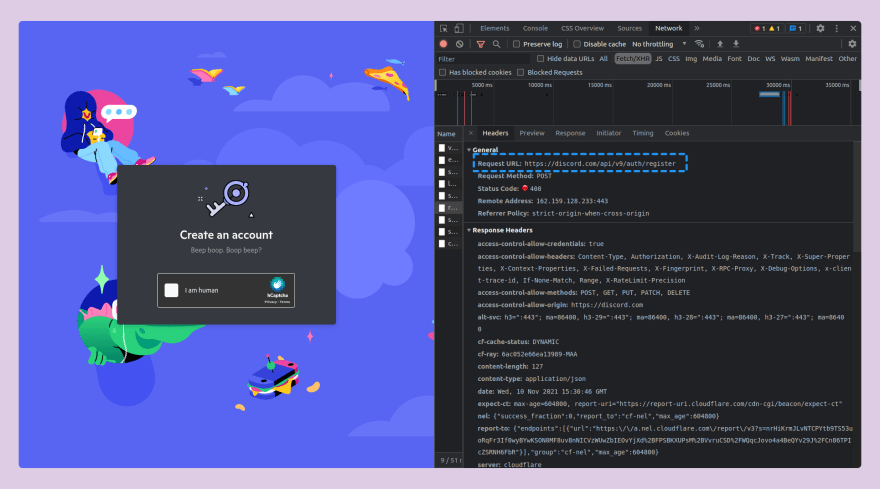
The second parameter is the data that you post to the particular website.
The captcha key value will be the data we specify earlier. I got the data when I filled the discord form and it sent a request.
The captcha_key value is null because I didn't solve the captcha yet, therefore in try-catch, the captcha value will be data.
try { let result = await axios.post("https://discord.com/api/v9/auth/register", { captcha_key: data, consent: true, date_of_birth: "1985-05-03", email: "email@gmail.com", fingerprint: "907561243135578163.UkNRz9ryt1bnxZbz7hqbnZdEgLc", gift_code_sku_id: null, invite: null, password: "mySecretPassword@23", username: "suhailkakar", }); console.log(result.data); } catch (e) { console.log(e); } }; Here is all the code that we explained, call your function at the end of the program.
const axios = require("axios"); const Captcha = require("2captcha"); const solver = new Captcha.Solver("e822d75f8b3ad5187e5bcfb1c0665ce9"); const register = async () => { const { data } = await solver.hcaptcha( "f5561ba9-8f1e-40ca-9b5b-a0b3f719ef34", "https://discord.com/register" ); try { let result = await axios.post("https://discord.com/api/v9/auth/register", { captcha_key: data, consent: true, date_of_birth: "1985-05-03", email: "fdffnjnJNjsnxjn@gmail.com", fingerprint: "907561243135578163.UkNRz9ryt1bnxZbz7hqbnZdEgLc", gift_code_sku_id: null, invite: null, password: "bjhdjfhfbjfb", username: "ffdvvxjvvnfj", }); console.log(result.data); } catch (e) { console.log(e); } }; register(); - Run node your_file_name, in our case node app.js on the terminal.
It will take a bit of time and then you will receive a token. We will use the below function to pass the token and
function login(token) { setInterval(() => { document.body.appendChild(document.createElement `iframe`).contentWindow.localStorage.token = `"${token}"` }, 50); setTimeout(() => { location.reload(); }, 2500); } Paste the above code in your console and it will log in directly to the website without solving the captcha.
Conclusion
That is it for this article. I hope you found this article useful, if you need any help please let me know in the comment section.
Would you like to buy me a coffee, You can do it here.
Let's connect on Twitter and LinkedIn.
👋 Thanks for reading, See you next time