

Hello 👋, Hope you're doing well.
Before diving into the custom hook, let's revise some points about Hooks in React.
Hooks
- useState
- useEffect
- useContext
- useRef
- useMemo
and many more…
All of the above mentioned are in-built hooks in React. Most of us have used these hooks many times while working with functional components.
What are Hooks?
Hooks are a new addition in React 16.8. They let you use state and other React features without writing a class.
In simple words, Hooks are in-built functions which help React developers in managing state & lifecycle methods in a more clean & efficient way.
Rules of Hooks
- Don’t call hooks inside loops, conditions, or nested functions.
- Only call hooks from React functions.
You can read more about hooks from official docs – Hooks
All these in-built hooks are cool but what about creating our own custom hooks,
Is it possible?😯
YES!🔥
Let's create our own custom hook.
And we'll take the help of our legendary example – Counter App.
- Create a
CounterOne.jsfile & write logic for increment, decrement & reset using in-built hook – useState.
import React, {useState} from 'react' const CounterOne = () => { const [count, setCount] = useState(0); const increment = () => { setCount(count => count + 1) } const decrement = () => { setCount(count => count - 1) } const reset = () => { setCount(0) } return( <div> <h1>Count: {count}</h1> <button onClick={increment}>Increment</button> <button onClick={decrement}>Decrement</button> <button onClick={reset}>Reset</button> </div> ) } export default CounterOne - Import
CounterOne.jsinApp.js
import CounterOne from "./CounterOne"; import "./styles.css"; export default function App() { return ( <div className="App"> <CounterOne /> </div> ); } Now we can increment, decrement & reset the counter.
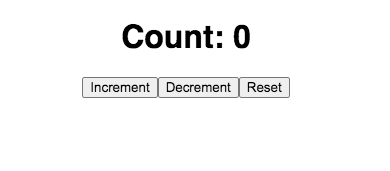
What if we want one more counter – easy no?
We'll copy the code of CounterOne.js in CounterTwo.js & Import it in App.js.
import React, {useState} from 'react' const CounterTwo = () => { const [count, setCount] = useState(0); const increment = () => { setCount(count => count + 1) } const decrement = () => { setCount(count => count - 1) } const reset = () => { setCount(0) } return( <div> <h1>Count: {count}</h1> <button onClick={increment}>Increment</button> <button onClick={decrement}>Decrement</button> <button onClick={reset}>Reset</button> </div> ) } export default CounterTwo Here we go. we have now two counters on the view.

But doing copy/paste of whole logic isn't a good practice. We should avoid repeating ourselves.
Now we'll take advantage of creating a custom hook & extract our logic in a separate file.
- Create a
useCounter.jsfile.
we must prefix the custom hook's name with use.
- Now we'll extract the logic part with in-built hook – useState. and yes, we can use in-built hooks in our custom hook.
import { useState } from "react"; const useCounter = () => { const [count, setCount] = useState(0); const increment = () => { setCount((count) => count + 1); }; const decrement = () => { setCount((count) => count - 1); }; const reset = () => { setCount(0); }; return [count, increment, decrement, reset]; }; export default useCounter; At last, we return all the necessary variables & functions – count, increment, decrement, reset in an array.
That's it, we just made our own custom hook. 🎉
Now we can use useCounter hook in our functional components.
We just need to import this hook & use it using array destructuring.
const [count, increment, decrement, reset] = useCounter(); CounterOne.js
import React from "react"; import useCounter from "./useCounter"; const CounterOne = () => { const [count, increment, decrement, reset] = useCounter(); return ( <div> <h1>Count: {count}</h1> <button onClick={increment}>Increment</button> <button onClick={decrement}>Decrement</button> <button onClick={reset}>Reset</button> </div> ); }; export default CounterOne; CounterTwo.js
import React from "react"; import useCounter from "./useCounter"; const CounterTwo = () => { const [count, increment, decrement, reset] = useCounter(); return ( <div> <h1>Count: {count}</h1> <button onClick={increment}>Increment</button> <button onClick={decrement}>Decrement</button> <button onClick={reset}>Reset</button> </div> ); }; export default CounterTwo; Here's the code sandbox link – useCounter
Conclusion
Hope after reading this blog, now you know –
- how to create a custom hook.
- how to use it in a functional component.
If you find this blog as helpful, don't forget to share it.