

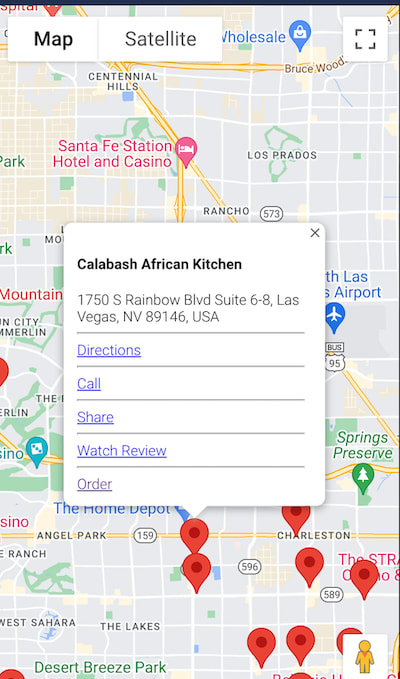
In the previous article, I wrote about creating a Keith Lee food app using React.js and Firebase.
Creating a Keith Lee Food App w/ React.js & ChatGPT
In this article, I will show you how I used the Google Maps Javascript SDK to display the list of restaurants on a map.
Google Maps Platform Documentation | Maps JavaScript API | Google Developers
I have discontinued using Firebase and moved to Netlify for hosting and Supabase for the backend. I will create an article on my steps to migrate away from Firebase to Supabase.
Develop and deploy websites and apps in record time | Netlify
The Open Source Firebase Alternative | Supabase
Enabling the Google Maps Javascript SDK
We are going to follow along with the documentation from Google.
Set up your Google Cloud project | Maps JavaScript API | Google Developers
Create a Google Project. Click on the blue Create new project button.

Fill out the form and click Create.

Now we need to enable Google Maps for our project. Go to the following link and click Enable the Maps Javascript API
Set up your Google Cloud project | Maps JavaScript API | Google Developers

The button below will initially state Enable. Click it then it will say Manage. **Now click **Manage
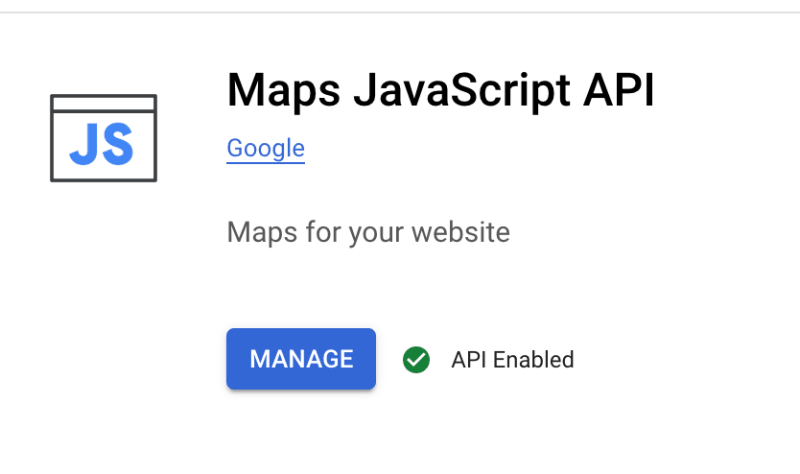
Click Credentials on the left hand side.

You will see your Google Maps API key. We will need this soon. You may also restrict the API key to localhost:3000. When you get a domain, you may add it to the list.

We will first need to load the Javascript API in our React project. Go to the following link. We will follow along with this documentation.
Load the Maps JavaScript API | Google Developers
I am going to use the recommended Dynamic Library Import. Add the following Javascript code before the closing body tag in index.html
<script> (g=>{var h,a,k,p="The Google Maps JavaScript API",c="google",l="importLibrary",q="__ib__",m=document,b=window;b=b[c]||(b[c]={});var d=b.maps||(b.maps={}),r=new Set,e=new URLSearchParams,u=()=>h||(h=new Promise(async(f,n)=>{await (a=m.createElement("script"));e.set("libraries",[...r]+"");for(k in g)e.set(k.replace(/[A-Z]/g,t=>"_"+t[0].toLowerCase()),g[k]);e.set("callback",c+".maps."+q);a.src='https://maps.${c}apis.com/maps/api/js?'+e;d[q]=f;a.onerror=()=>h=n(Error(p+" could not load."));a.nonce=m.querySelector("script[nonce]")?.nonce||"";m.head.append(a)}));d[l]?console.warn(p+" only loads once. Ignoring:",g):d[l]=(f,...n)=>r.add(f)&&u().then(()=>d[l](f,...n))})({ key: "YOUR_API_KEY_HERE", v: "weekly", libraries: ["marker", "maps"] // Add other bootstrap parameters as needed, using camel case. // Use the 'v' parameter to indicate the version to load (alpha, beta, weekly, etc.) }); </script> Notice we are adding the marker and maps libraries. Make sure to add your API key here.
Now let’s create a new React functional component. We can also copy the firebase code from the previous article.
import {Box} from "@mui/material"; const config = { // Your Firebase project's config object goes here }; firebase.initializeApp(config); const db = firebase.firestore(); const RestaurantMap = () => { return <Box sx={{ height: '100vh', width: '100%' }} id="map" > </Box> } export default RestaurantMap; You can run the code and it will show a blank Google map.
You can run the code and it will show a blank Google map.
We will then load the markers on the google map. Add this right above the return. Note I have comments of numbers. I will detail those steps under the code.
Also, we are querying firebase again. We could use redux-toolkit to load and save the data only when needed. For now, we will load it again. In the future, I may add redux-toolkit. It would only take a few mins to implement.
Quick Start | Redux Toolkit
useEffect(() => { // Get data from the 'tiktoks' collection in Firestore const google = window.google; // 1 const {Map} = await google.maps.importLibrary("maps"); // 2 const map = new Map(document.getElementById("map"), { center: {lat: 36.188110, lng: -115.176468}, zoom: 12, }); db.collection('tiktoks').get() // 3 .then(snapshot => { const data = snapshot.docs.map(doc => doc.data()); // Each item in firebase const position = {lat: place.lat, lng: place.lng}; const marker = new google.maps.Marker({ // 4 map: map, position: position, title: place.name, }); // ...Retrieve variables below depending on what you want to do const information = new google.maps.InfoWindow({ // 5 content: ' <h4>${place.name}</h4> <div> ${address} </div> ${dir} ${callDiv} <hr> <div> <a href="${shareHref}" target="_blank"/>Share</a> </div> <hr> <div> <a href="${tiktokUrl}" target="_blank"/>Watch Review</a> </div> ${orderUrl} ' }); marker.addListener('click', function () { // 6 information.open(map, marker); }); }) .catch(error => { console.log(error); }); }, []); -
Add the google library
-
Import the maps library from google and create Map object. I have this centered in Las Vegas, since this is where most of the food reviews happen.
-
Get the list of items from firebase
-
Add the Google Marker for the current item
-
Add the InfoWindow to the Google Marker. This is the popup that shows when you click the Google Marker.
-
Add a click listener to the marker to make the InfoWindow popup when you show it.
You can refer to the documentation for further customization:
Add a Google Map with a Marker to Your Website | Maps JavaScript API | Google Developers
A few days after creating this map with the list of items, I found someone created a Google MyMaps on reddit.
I liked it so much, I decided to add it to the web app on a separate page

Thanks for reading. Let me know if any clarification is needed. You can find the Keith Lee food app at the following link:
Keith Lee Food Reviews