

Author: Muhammad Khabbab
Introduction
ENTRYPOINT is one of the many instructions you can write in a dockerfile. The ENTRYPOINT instruction is used to configure the executables that will always run after the container is initiated. For example, you can mention a script to run as soon as the container is started. Note that the ENTRYPOINT commands cannot be overridden or ignored, even when you run the container with command line arguments.
Docker ENTRYPOINT instructions can be written in both shell and exec forms, such as the following example below:
• Shell form: ENTRYPOINT node app.js
• Exec form: ENTRYPOINT [“node”, “app.js”]
Steps we'll cover:
- How does docker ENTRYPOINT work?
- Docker entrypoint example commands
- Difference between ENTRYPOINT and CMD
- When to use docker ENTRYPOINT vs CMD
- How to use a script as ENTRYPOINT
How does docker ENTRYPOINT work?
Both forms of Docker entrypoint work differently when you specify any command at run time. The major difference between the two is whether the specified command is invoked inside a shell or not. Let's discuss both in detail:
• When you specify the command line arguments to the docker run command through exec form, these arguments are appended to the end of all elements of the exec form, so the specified commands will run after the executables mentioned in entrypoint. For example, if you pass the '-d' argument to the 'docker run' command, the Docker will consider these arguments as the arguments of entrypoint and will execute them in the background. By doing this, you can turn your container into an executable. You can even add additional arguments to the entrypoint to convert a complex command line tool into a single argument docker container. The exec form just runs the binary you provide with the arguments you include but without any features of the shell parsing.
• The shellform will execute the shell parameters as parameters to/bin/sh –c. That allows you to expand variables, piping output, subcommands, chaining commands together, and other shell features. You cannot useshellform to specify any command or thedocker runcommand-line arguments while starting the container because the ENTRYPOINT command runs as a subcommand of/bin/sh –c. The executable has a different process ID than the container's 'PID 1'. If we pass any Unix signals like SIGTERM from thedocker stop` command, the executable will receive it.
You can override the entrypoint instruction when initiating the container using the –entrypoint flag. Note that if you have mentioned multiple ENTRYPOINT instructions in the Dockerfile, then the last entrypoint will be executed. The recommended forms to use are:
• ENTRYPOINT: exec form
• RUN: shell form
• CMD: exec form
Building a side project?
Meet the headless, React-based solution to build sleek CRUD applications. refine expertly combines cutting-edge technologies under a robust architecture, so you don’t have to spend time researching and evaluating solutions.
Try refine to rapidly build your next CRUD project, whether it's an admin panel, dashboard, internal tool or storefront.
Docker entrypoint example commands
The following example shows an entrypoint instruction that launches the benchmarking tool to evaluate the Google website. Note that the website URL of “Google.com” is hardcoded inside the dockerfile. We will also show an example where the URL will be passed from the Docker run command as an argument.
 FROM centos:7
 MAINTAINER Devopscube
 RUN yum -y update &&
     yum -y install httpd-tools &&
     yum clean all
 ENTRYPOINT ["ab" , "http://google.com/" ]
The next step is to build the image from this docker file. Assume the name of the above docker file is “Dockerfile”. The image name can be specified with “-t” parameter. In this example, the image name provided is “testentrypoint”. The parameter “directoryName” is the folder having the default Dockerfile.
docker build <directoryName> –t testentrypoint
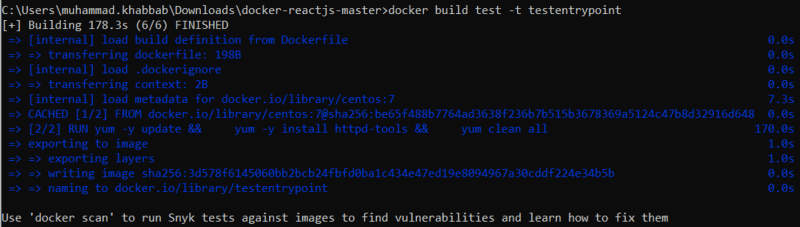
During building the container image, the docker daemon will look for the entrypoint instruction and will specify it as a default program that will always run whether the command line input is added or not upon container start.
Now that the image has been created, the next step is to run the container. Just mention the image name in the docker run command.
Docker run testentrypoint
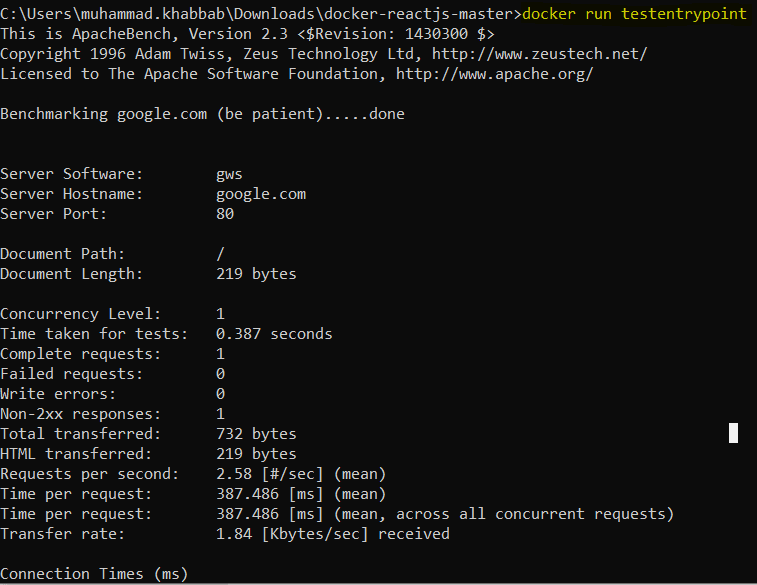
You can see the benchmarking tool “Ab” executing upon container start.
Difference between ENTRYPOINT and CMD
Before we discuss the differences, let's look at some of the similarities between these two:
• Both the commands are executed during docker run.
• Both CMD and ENTRYPOINT instructions define the commands which will be executed upon running a container
• You can override both commands by passing an argument during docker run.
• If multiple declarations are made, only the last CMD and ENTRYPOINT will be valid.
Both commands are different in the following aspects:
• CMD command is ignored by Docker daemon if you specify parameters within the docker run command. ENTRYPOINT, on the other hand, is not ignored; instead, it is appended as command line parameters by considering those as arguments of the command.
• ENTRYPOINT specifies the executable to be invoked when the container is started. Whereas CMD specifies the arguments that are passed to the ENTRYPOINT (for arguments).
Here is a quick summary table that clarifies the behavior of using CMD and ENTRYPOINT:
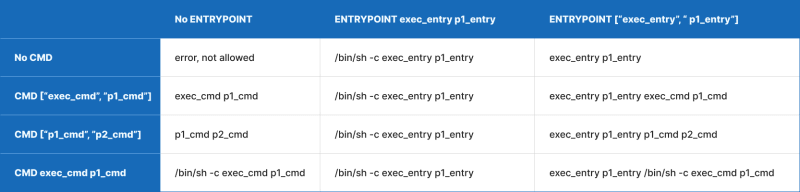
Let's extend the above entrypoint example to CMD. The below example will work the same way as the above example of entrypoint, however, this time using CMD.
 FROM centos:7
 MAINTAINER Devopscube
 RUN yum -y update &&
     yum -y install httpd-tools &&
     yum clean all
 CMD ["ab"] ["http://google.com/"]
However, if you run docker run testentrypoint ab http://bing.com/ then the whole CMD command inside the dockerfile will be ignored, and the command arguments passed through the docker run command will be given preference. That is not the case with entrypoint instruction. Whatever you provide through entrypoint actually appends to the existing entrypoint instruction in the dockerfile. Let's look at the example below:
 FROM centos:7
 MAINTAINER Devopscube
 RUN yum -y update &&
     yum -y install httpd-tools &&
     yum clean all
 ENTRYPOINT ["ab"]
Now you can run docker run testentrypoint http://bing.com/ to achieve the same results because the arguments to docker run will be appended to the instruction present in dockerfile and will not be overridden.
We can combine both CMD and entrypoint in the same image too. Look at the example below:
 FROM centos:7
 MAINTAINER Devopscube
 RUN yum -y update &&
     yum -y install httpd-tools &&
     yum clean all
 ENTRYPOINT ["ab"]
 CMD ["http://bing.com"]
Note that when ENTRYPOINT and CMD are both used in the same Dockerfile, everything specified in the CMD will be appended to the ENTRYPOINT as an argument.
When to use docker ENTRYPOINT vs CMD
ENTRYPOINT instructions can be used for both single-purpose and multi-mode docker images where you want a specific command to run upon the container start. You can also use it to build wrapper container images that encapsulate legacy programs for containerization, ensuring that the program will always run.
The optimal use case for CMD instruction is to specify default programs that should run if you do not provide any input arguments in the command line.
To conclude:
• Use ENTRYPOINT instructions when creating an executable Docker image with commands that must always be executed.
• Use CMD instructions for an additional set of arguments that will serve as default instructions in case there is an explicit command line argument provided when the container runs.
How to use a script as ENTRYPOINT
Using a custom shell script inside the docker container is another use case for entrypoint. Here are the steps:
- Create a script file e.g.
script.shand put it in the same folder as the dockerfile - Create the dockerfile as below. This will copy the script to the container and will run it as part of the ENTRYPOINT using the arguments from CMD. Assume the script expects to receive two input parameters upon its execution.
 FROM centos:7
 MAINTAINER Devopscube
 RUN yum -y update &&
 yum -y install httpd &&
 yum clean all
 COPY ./script.sh /
 RUN chmod +x /script.sh
 ENTRYPOINT ["/script.sh"]
 CMD ["param1", "param2"]
- Build the docker file
docker build -t <imageName> -
Now run the container passing the parameters:
a.docker run --name <containerName> -d <imageName> -
You can even pass the CMD arguments through
docker runcommand. It will override the arguments present in the Dockerfile. See below example:
docker run --name <containerName> -d <imageName> <param1> <param2>