

Recap of the last post
In the first part of the series, we saw about values and variables in JS.
Points to be remembered,
-
There are a total of 9 types of values in JS, categorized into
primitive values, and objects & functions. -
Primitive values contain Undefined, Null, Numbers, Strings,
BigInts and Symbol. -
Apart from the above types everything else is objects. e.g.,
Arrays, Date, regular expressions come under objects. -
Primitive values are immutable (cannot be modified).
-
Objects and functions are mutable (can be changed).
-
A variable must represent a value it can hold any value from
the above types.
In this post, we are gonna concentrate on objects.
Introduction to Objects
Arrays, Dates, regular expressions, and other non-primitive values come under objects.
console.log(typeof({})); // "object" console.log(typeof([])); // "object" console.log(typeof(new Date())); // "object" console.log(typeof(Math)); // "object" We know that objects are non-primitive values which means that by default objects are mutable.
To create an object we need to use the { } object literal, which creates a brand new object value.
let newObj = {}; let anotherObj = {}; console.log(typeof(newObj),typeof(anotherObj)); // object object In the above code, newObj and anotherObj are objects.
A diagrammatic representation of the above two variables will look like the below diagram.

From the above diagram, we can conclude that each of the two variables will have a brand new object value.
Properties in objects
An object contains properties that are basically key-value pairs.
let objectWithProperty = { propertyOne: "This is property one", propertyTwo: "This is property two" } propertyOne and propertyTwo are called keys. “This is property one” and “This is property two” are called values. A value can be of any type in this example I have a value in the string type but you can store literally any type of value in the values field.
To access the properties of an object we use either dot(.) notation or bracket ([ ]) notation.
let objectWithProperties = { propertyOne: "This is property one", propertyTwo: "This is property two" } console.log(objectWithProperties.propertyOne); // "This is property one" using dot notation console.log(objectWithProperties[propertyTwo]); // "This is property two" using bracket notation A diagrammatic illustration of the above code looks like this,
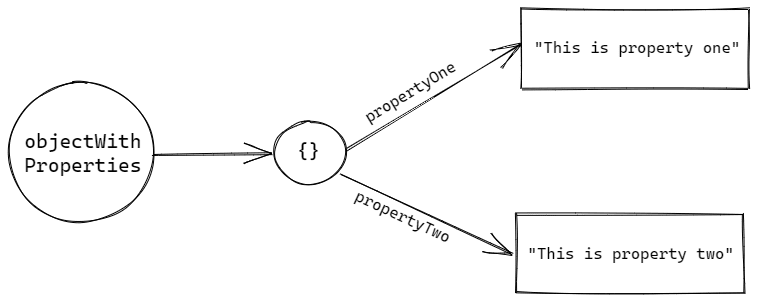
Properties have names. A single object can’t have two properties with the same name.
For example, let's say we have a property called name in an object. We can't declare another property with the same property name 'name' in the same object.
If we try to do it, then Javascript will take the last key-value pair and neglects the previous key-value pairs of the same names.
let person = { name: "Anne", age: 32, name: "Hathway" } console.log(person); // {age: 32, name: "Hathway"} 1st name property is neglected console.log(person.name); // "Hathway" not "Anne" In the above code snippet, the first name property is neglected and the last name property is taken.
The property names are always case-sensitive in Javascript. For example, name and Name would be two completely different properties from JavaScript’s point of view.
If we don’t know a property name ahead of time but we have it in code as a string value, we can use the [] “bracket notation” to read it from an object.
What about missing properties?
If we try to access the properties which are not defined in an object it will not throw an error instead it will return undefined as a value.
Example:
let person = { name: "Anne Hathway" }; console.log(person.age); // undefined Javascript follows certain steps while dealing with objects. They are:
- Figure out the value of the part before the dot (.).
- If that value is null or undefined, throw an error immediately.
- Check whether a property with that name exists in our object.
- If it exists, answer with the value this property points to.
- If it doesn’t exist, answer with the undefined value.
Now consider the below code snippet,
let person = { name: "Anne Hathway", }; console.log(person.address.city); // ? What will be the output of the above code snippet?
If you thought that the answer would be an error, you are right.
But, How? Read rules 1 and 2, if the left side of the dot operator is null or undefined it will throw an error.
I hope I had given enough details about objects in Javascript Universe.
If you want to know more about objects read the MDN docs.
If you like the content connect with me on Linkedin.
See you all in my next post. Have a good day!