

Arrays in JavaScript are useful data structures that are used to store collections of information. Looping through arrays is a powerful tool to iterate through arrays and do things with its data when programming. While loops work well, there are simpler methods to iterate through information in Java. These methods are actually built into JavaScript! They're called Array iterator methods.
I, like many others, struggled with the concept of array iteration, and its specific built-in methods. Although the methods are very very handy, they can be somewhat difficult to get an understanding of.
Here, I will dive into JavaScript's different built-in array iteration methods, and hopefully you will leave here with a better understanding on how they work!
METHODS
.find() Method
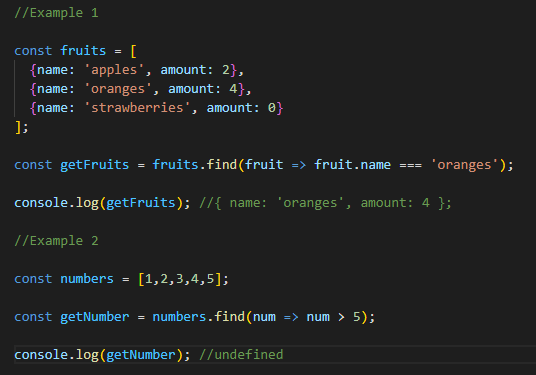
The Array.find() method is used to iterate through the given array it's attached to and will return the first element that “satisfies” the passed argument/condition. This argument/condition in the parentheses is a function! This allows the .find() method to execute more complex searches. If nothing meets the given condition in the callback function it will return undefined. Example:
.filter() Method
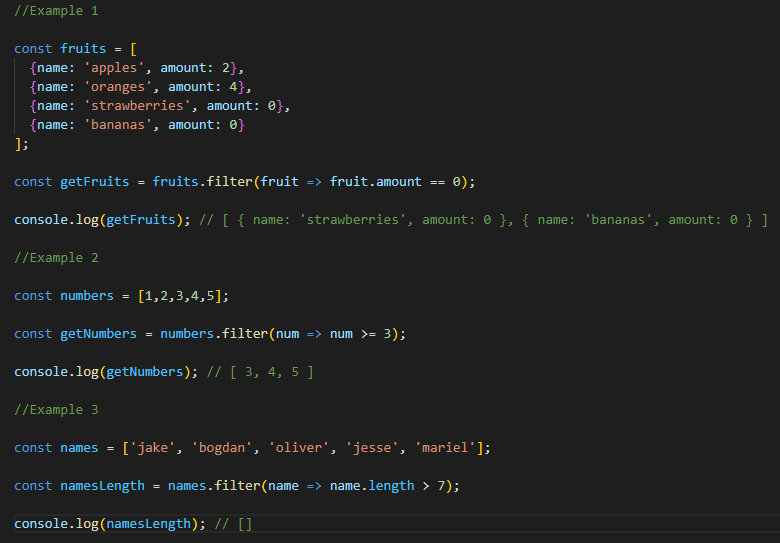
The Array.filter() method is used to iterate through a given array and will return ALL elements that satisfy the passed argument/condition. These passed elements will be copied into a newly created array that is created by the method itself. This method also takes a callback function as the argument/condition so it can execute more complex searches. One note is since this method creates an entirely new array, results that don't satisfy the condition at all won't return undefined. Rather, these results will return an empty array. Easiest way to think of it is in the name itself: a filter! You take away everything you don't want and leave behind the things you do!
Example:
.map() Method
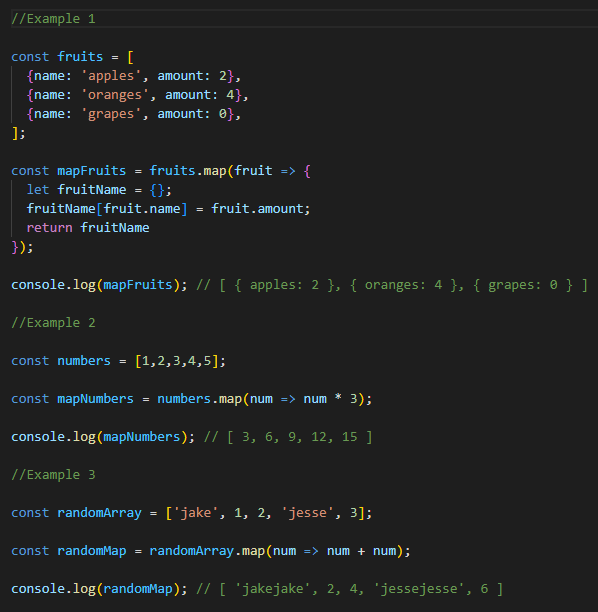
The Array.map() method is used to iterate through a given array and modifies all of the elements of the array. This method also creates a new array. It will be the same length of the original array, and will be populated by all the modified results. This method also takes a callback function, which will be used to defined how we want to modify the given array. Side note: depending on the types of data in the array you could get interesting results. For example, an array containing strings and numbers may transform differently.
Example:
.reduce() Method
The Array.reduce() method is used to iterate through a given array to reduce all the given elements of the array to a single value. The method takes a callback function which is the “reducer” in this case. The function passes on each element of the array in order. The return result of this is a single value. The callback function should also take an initial value. Easiest way to think of this is this number is where the callback function will begin to execute. Else, if left empty, the first element of the array at index 0 is used as the initial value- which would then start the iteration at index 1 (the second value of the array) and you could get some surprising results from this. In some cases it won't matter, in some it might. With that being said, it's usually better to put a number. If you want to start at the first element of the array, put 0, and so on.
Example:
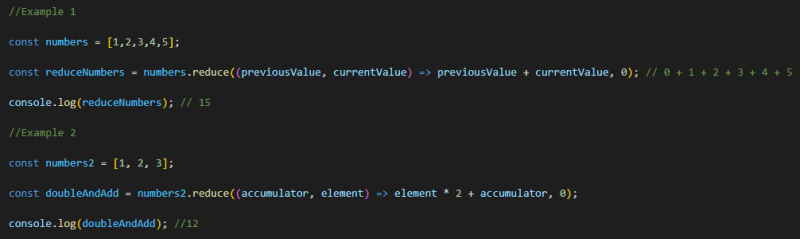
Note: In Example 1 it doesn't matter if this contains an initial value. Here it is without:

However, in Example 2 it does matter if it contains an initial value. Here it is without:
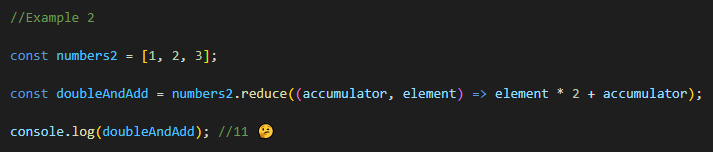
In example 2 without the initial value the callback function never executes for the first element of the array.
.forEach() Method
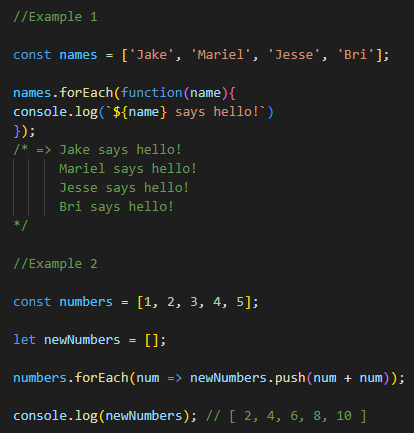
The array.forEach() method is used to iterate through a given array and executes the provided argument(function) for each element. The provided argument/condition takes a callback function. Unlike previous methods, .forEach() differs in the way that it doesn't have a built-in return value. forEach() is the least expressive iterator method. Most of its purposes are better served by the uses of .map() or .reduce(). So when should you use .forEach() then? Well, there aren't a lot of real uses for forEach(). One good one is to log each value of an array – which is great to use when debugging!. It's better in this case than .map() because there is no use for creating a new array if you just want to log the values of an array.
Example of forEach:
Closing Comments
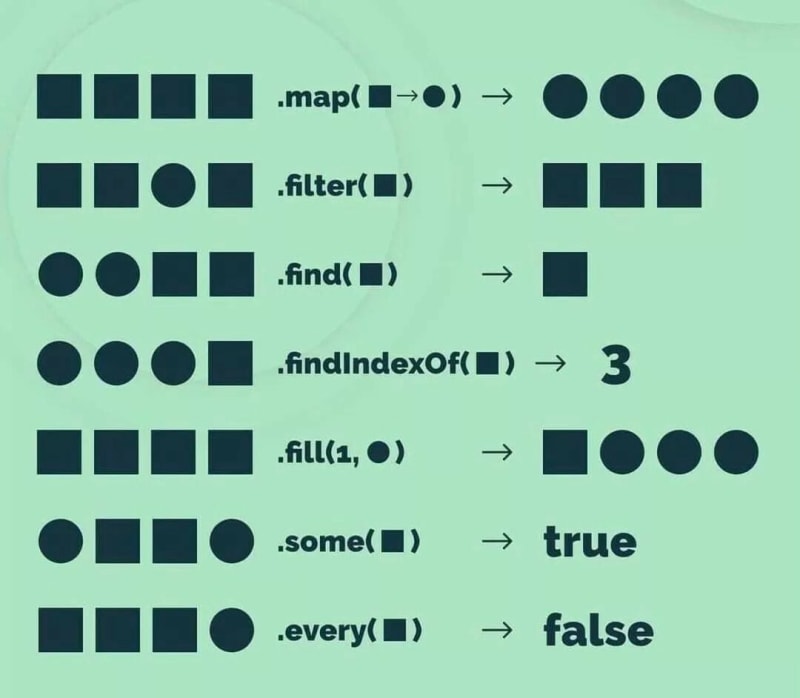
Array iterator methods are very very powerful tools for programmers. While hard to understand and grasp the concepts of each one and some maybe more than others; The best thing you can do at the end of the day is code. Practice practice practice makes perfect. Just writing code and practicing using these methods will make them much easier to understand. Once you can fully grasp/understand the concepts and uses for each of these methods, you will have these powerful tools at your coding arsenal. I hope this could help people appreciate and learn more about array iteration methods and how they work.
Keep coding and never stop moving forward <3
My GitHub 🙂