

As a beginner, you need to know why we use useState, how its executed and why do we need it. These sections will be discussed as we deep dive into useState hook.
For a start, we need to understand why we need useState. Using vanilla Javascript code doesn't trigger component re-render. Take for example the code below:

Examining the code above, you'll probably think that the title should change because we're re-assigning it a value, right?
However, that's not what is happening. Rather, you can see that the title has a new value called “Updated” in the console but the DOM did NOT change. Why is that you ask? That is because when React renders the component a second time, the local variables don't persist, and the second reason is that, local variables don't trigger re-render/renders.
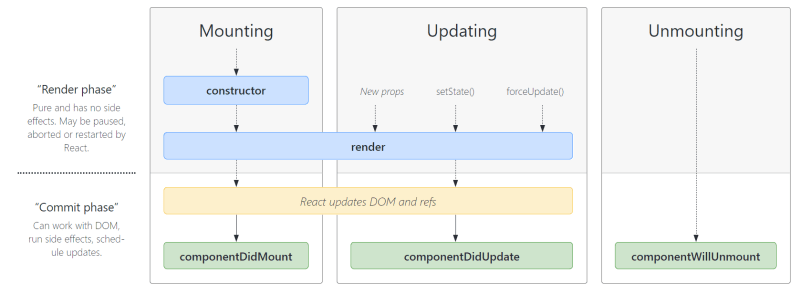
By default, the DOM only gets mounted ONCE and will never re-evaluate even if a change occurred. To update a component, 2 things need to happen, 1, for the data between render to be retained and 2, for React to render the component with the new data. Now let's try to understand that visually.
This entire process is the mounting phase of the React Component Lifecycle which only happens ONCE when the components are first evaluated and rendered for the first time

Now, we're faced with an issue where React will never repeat the same process. As soon as it's rendered for the first time, it's done. However, most of the time, we want to be able to change the values rendered on the page when a change occurs. That's when we're going to need states.
As mentioned above, React ignores any normal/vanilla variables even if a change occured. It doesn't trigger the component to re-render and even if it does, it will just re-create the variable with the same value. Even if there's a click or any other event listener, it doesn't trigger the component to run again.
In useState however, any changes to its values should result in the component function being called again.
useState returns two values, a pointer to the managed state, and the second value is a setter function that can be called later to set a new value, you can access access these values using an array destructuring.
When the setter function is called and re-renders the component, it will compare the virtual dom and the actual dom to check if there’s a change in the data or the component itself, if there is then it will replace the actual dom with the new values.

To be accurate, it's comparing the current evaluation to the previous evaluation. If there's any change, those changes is handed over to the ReactDOM which makes necessary changes in the real DOM.
This phase or state is called the Updating phase in the React component lifecycle.
Another thing to note is that the console log doesn’t print the updated value straight away, rather, it prints the value BEFORE it was updated. The reason for that is because useState doesn’t change the value right away, rather, it schedules the update.
On top of that, states are per component instance basis, meaning, if you change the state in one component, the other component state isn't affected. Think of it as a modular state, separated from the other component.
State snapshots
How do we then get the latest state snapshot? Meaning, how do we get the latest value? Well, think of it this way, imagine depositing your money in the bank, they now manage your money for you, as days go by, the interest in your account accumulates. A year later, you withdraw your money which now has interest on top.

Likewise, in React, it's like telling React to give you the latest snapshot that you asked to be managed, hence, you have an access to its previous change and manipulate it like so:
const [detectChange, setDetectedChange] = useState(false); setDetectedChange((previousState) => !previousState);